

Google Calendar jumps from 11 to 24 default colors, plus up to 200 custom
The color limits are finally loosening: rollout starts now for rapid release, then expands June 29.
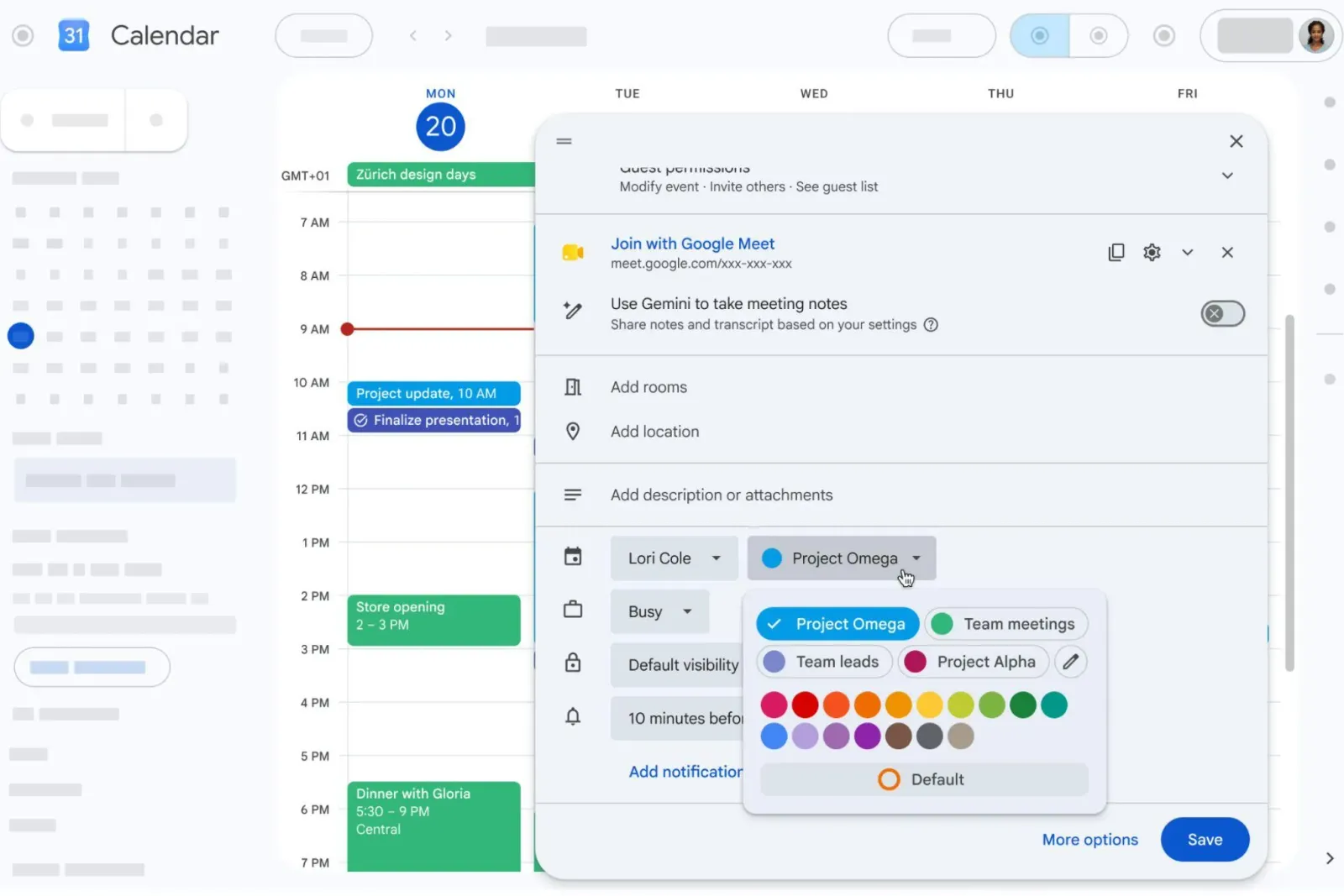
Google is expanding Google Calendar’s event color options, replacing the 11 predefined colors with 24 defaults and adding an RGB picker for deeper customization, including up to 200 custom colors per event across web, mobile, and the Calendar API. For decision-makers, this is a product surface area shift with implications for admin governance, user behavior, and platform integration.
Google Calendar just stopped pretending color is optional. Instead of 11 predefined event colors, Google is rolling out 24 default options, plus the ability to pick custom shades via an RGB color picker. Even better for power users: you can select up to 200 custom colors for individual events, and this applies not just in the native Calendar web experience, but also across native Calendar web and mobile apps and the Calendar API.
The timeline is also pretty concrete. The update began rolling out yesterday for users on Google’s rapid release domains, with an extended rollout for more users starting on June 29. Google notes the update may take a few weeks to reach everyone. If you manage a Workspace deployment or you are the person everyone asks about “why did Calendar change,” this is one of those silent UI upgrades that can still affect workflows, templates, and automation.
So why does this matter beyond whether your calendar looks “more you”? Because event colors are one of those low-tech, high-signal ways people organize time. Traditionally, most calendar users rely on a small set of colors for categories like work, personal, meetings, or projects. When the palette is small, people compress meanings into fewer buckets. When the palette expands, users can increase granularity without changing their system, and that changes behavior. A bigger set of default colors and up to 200 custom options nudges people toward more detailed tagging, which can then ripple into how teams interpret schedules at a glance.
This also lands at an interesting intersection of consumer UX and enterprise admin reality. The update is available to all Google Workspace customers, Workspace Individual subscribers, and users with personal Google accounts. That means the feature is not trapped behind a narrow enterprise flag. In practice, admins who care about consistency might need to think about whether these custom colors introduce new variation across org calendars. Even if Google is not adding new policy knobs in this specific announcement, expanding customization usually increases the chance of “each team built their own mini taxonomy,” which can complicate onboarding or shared calendar interpretation.
There is also a developer angle. Google isn’t only changing the web UI. It says the expanded options are available via the Calendar API as well. For teams building scheduling tools, sync layers, or internal automations on top of Google Calendar, more color capacity can mean better mapping between your internal statuses and the external representation. Previously, with a smaller predefined set, integrations might have been forced into coarse categories. Now, with RGB selection and up to 200 custom colors, integrations can preserve more detail and reduce the lossy translation between systems. That can be a quiet quality-of-life upgrade, especially for products that display events with meaningful color semantics.
Another practical point: the rollout strategy matters. Rapid release first, then broader coverage on June 29, then “a few weeks” to reach everyone. That staggered deployment pattern is common with large platform updates, but it has operational consequences. Within an organization, you can get mixed experiences for a while. Some users will see 24 defaults and the custom RGB picker. Others will still be constrained by the previous 11 color limit until their rollout lands. If your workflows depend on colors, you may need to anticipate temporary inconsistencies during the transition window.
And yes, it is “just color,” but tech companies know that small UI constraints often become product boundaries. Google is directly removing one of those boundaries by expanding both default choices and custom capacity. That signals a shift in how Google is managing “small” user friction: fewer complaints about running out of colors, fewer hacks like reusing colors across unrelated categories, and fewer workarounds for users who want a specific hue for a specific meaning. For executives and operators, the second-order effect is simple: when customization expands, users do more with it. Your internal systems, your training materials, your best-practice guidelines, and any third-party integrations may need to reflect the new reality.
For peers making similar platform decisions across productivity tools, the lesson is that customization limits can have outsized impact on user organization and developer ergonomics. Google’s move from 11 to 24 defaults, plus up to 200 custom colors per event and support through the Calendar API, closes a gap that previously forced compromises. The stakes are not just aesthetic. It is about how people encode meaning in time, how teams coordinate across calendars, and how ecosystem tools can represent that meaning accurately.
This story's Key Insights and Take-aways are locked.
Create a free account to unlock Executive Actions for one credit.
Register to UnlockAlways free for Executives Club members. Join the Club
More in Technology

Nvidia's $89B data center quarter: the 9 companies cashing in
The AI buildout is minting fortunes beyond GPUs, and memory, cloud, and cooling suppliers are riding the same wave.
Google quietly links your phone number to every Android account on your SIM
Adding a SIM now ties your phone number to all Google accounts - and future accounts inherit it. Here's the security and privacy stakes.

Hijacker AI 'Skynet mode' runs 100,000 attack steps against exposed models
Symantec caught a criminal AI agent that borrows other models, steals data, and mines crypto; the only relief is no confirmed victims yet.