
Google adds browser-based flight simulator in Google Earth, no download needed
Google Earth’s new in-browser flight simulator mode brings pilot-style thrills to everyday browsers, with real implications for web 3D.
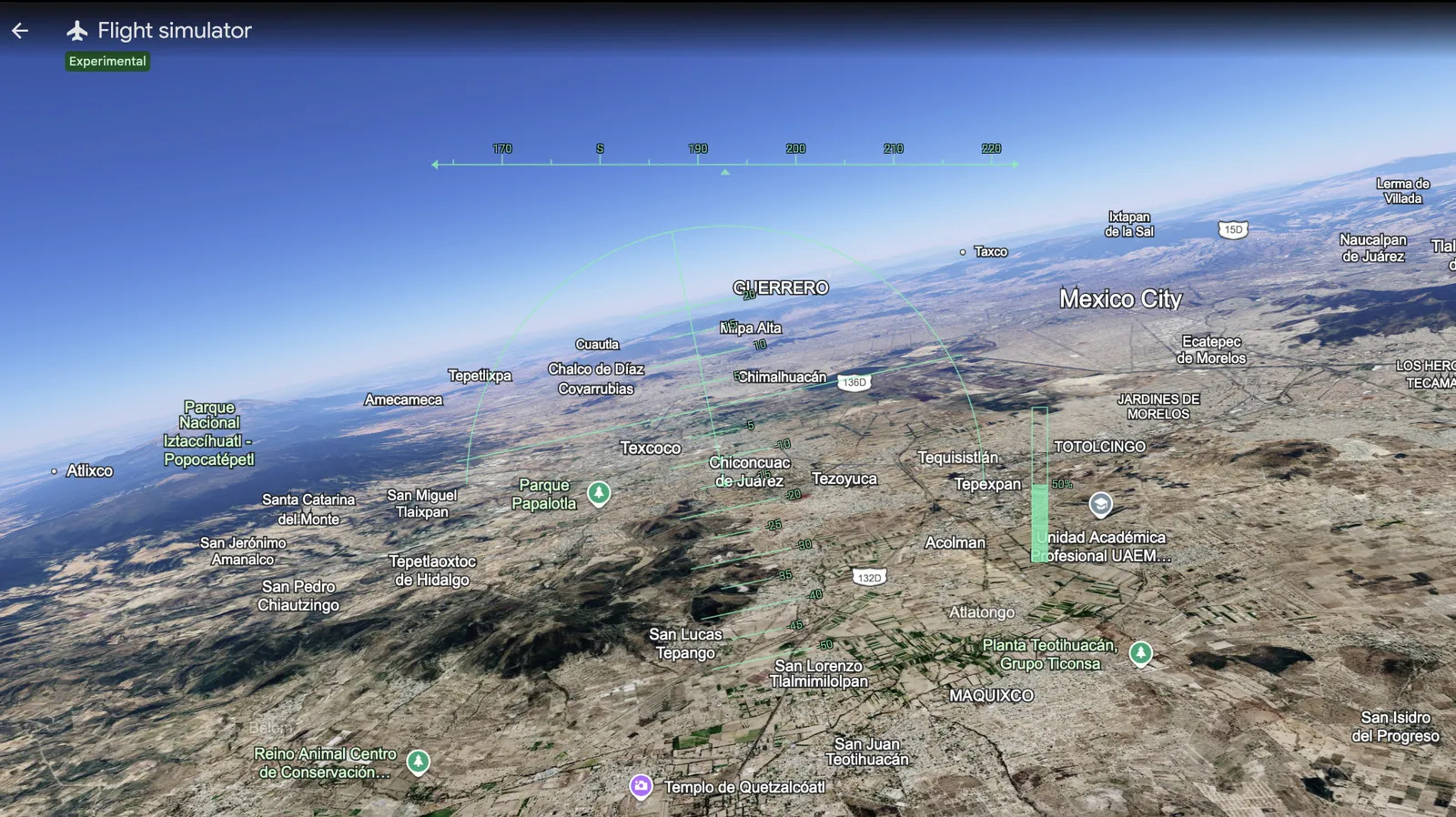
Google has made a flight simulator mode available directly in your browser within Google Earth. For decision-makers, this is a signal that Google is compressing the gap between heavyweight 3D experiences and instant, frictionless web access.
Google Earth’s flight simulator mode is now available in your browser, meaning you can take off without installing anything, signing into special apps, or even breaking out a desktop client. The pitch is simple and the stakes are surprisingly real: it turns “look at maps” into “fly through maps” using the web as the platform.
The key shift is the distribution model. Up until now, immersive 3D experiences often came with friction: downloads, plugins, heavyweight setups, or device constraints. Here, Engadget reports that the flight simulator mode is available in your browser, so the only real “gear” you need is a modern browser. That changes the user conversion equation from “do I want this enough to set it up?” to “do I have ten seconds right now?” And yes, there is an immediate incentive to crash as part of the learning curve, but the bigger point is that the experience is designed for quick discovery.
Why should executives care about a flight simulator in Google Earth? Because this is exactly the direction the web has been moving for years: toward richer, more interactive content that runs with less setup and less friction. When a platform like Google takes a feature that feels like a dedicated product, and ships it as a browser mode, it reduces the barrier for adoption. That is not just a user-experience win. It is a distribution advantage.
In markets where product adoption is constrained by install friction, web-first releases can reshape the competitive surface. If users can try something instantly, they can share it instantly, and they can bounce into deeper sessions without waiting for downloads or reconfigurations. For boards and leadership teams, that means watch how engagement is measured and how funnels are designed. Browser-based modes can make the top of funnel dramatically easier, but they also raise expectations for performance, stability, and responsiveness. If your experience stalls, users will leave faster because there is no “install commitment” to keep them around.
There is also a second-order implication for the broader web 3D ecosystem. A flight simulator mode is not a “skin” on a page. It implies interactive rendering, input handling, and a smooth enough experience to feel responsive while you fly. When Google delivers this in the browser, it effectively normalizes the idea that complex 3D interactions belong on standard web infrastructure. That can pull competitors and partners toward similar approaches: either by adopting more capable rendering stacks, or by partnering with platforms that can deliver that kind of experience.
Regulatory context matters too, even if the headline is playful. Mapping and navigation are highly regulated domains in many regions, and they come with ongoing scrutiny around data accuracy, location services, and privacy. While the source does not add detail beyond announcing the browser availability of the flight simulator mode, the broader implication is that Google is continuing to extend its Earth experiences within mainstream access channels. When more people can interact with geospatial content directly in the browser, governance teams should think about what falls under existing compliance regimes and how product changes might affect user data handling, telemetry, and location-related permissions.
Now, the strategic stakes for peers in similar roles: this is a reminder that platform incumbents do not just “add features.” They change how features get discovered and adopted. A browser-based simulator shifts Google’s Earth offering from a viewing experience toward a practice environment, even if the feature remains playful and approachable. That changes user habits. Once people start flying through a digital world, they build familiarity with the interface and the geography layer, which increases the likelihood they will return, explore, and potentially spend more time in adjacent Google Earth capabilities.
If you are a CEO, CTO, or product leader watching this, the question is not “can our app do a flight simulator?” It is “what would happen to our adoption curve if our most engaging experiences became instant, browser-native modes?” Engadget’s report that the flight simulator mode is now available in your browser is a small headline with a big direction. The web is no longer just for reading about things. It is where the action can be, immediately.
This story's Key Insights and Take-aways are locked.
Create a free account to unlock Executive Actions for one credit.
Register to UnlockAlways free for Executives Club members. Join the Club
More in Technology

Nvidia's $89B data center quarter: the 9 companies cashing in
The AI buildout is minting fortunes beyond GPUs, and memory, cloud, and cooling suppliers are riding the same wave.

A YouTuber dissected the iPhone Duo and thinks he found crackgate's cause
CuriousHagi's teardown of Apple's foldable reveals a gear-like hinge that may explain why screens crack in the same spot within hours.

Google quietly links your phone number to every Android account on your SIM
Adding a SIM now ties your phone number to all Google accounts - and future accounts inherit it. Here's the security and privacy stakes.